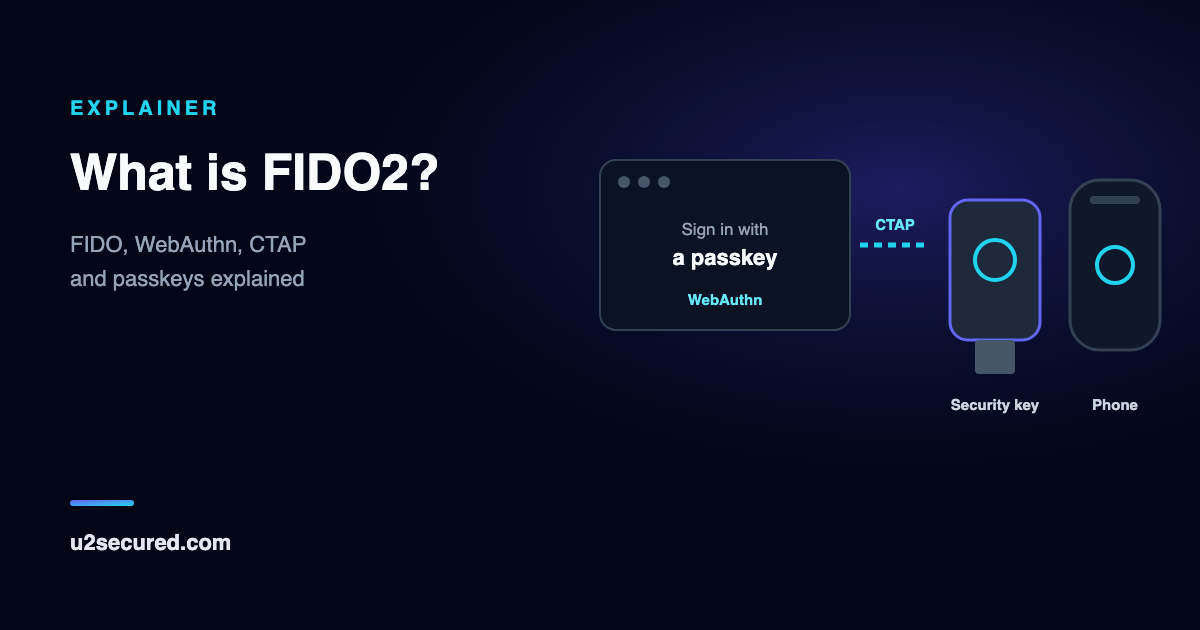
What FIDO stands for, and the FIDO Alliance
FIDO stands for Fast IDentity Online. The FIDO Alliance is the industry group that writes the standards; it was announced in February 2013 with six members and had more than 220 member organisations by 2015.
Its aim from the start was to reduce the world’s reliance on passwords, by replacing typed secrets with keys that stay on a device. The first finished standards, FIDO 1.0, were published on 9 December 2014 and came in two flavours: UAF, for signing in to apps with no password, and U2F, a second factor you add after your password, usually with a USB security key.
What is FIDO authentication, in one sentence? Proving who you are by having a device sign a challenge with a private key, after you unlock it locally, so that no reusable secret ever travels to the website.
What is FIDO2 and how does it work?
FIDO2 merged those two ideas into one standard that works in every major browser and operating system. It supports both uses: a second factor after a password, and a full replacement for the password.
Registration happens once per site. When you create a passkey or add a security key, your authenticator makes a new key pair just for that website. The private key stays on the authenticator. The public key, which is useless to anyone who steals it, goes to the site, along with an ID for the credential.
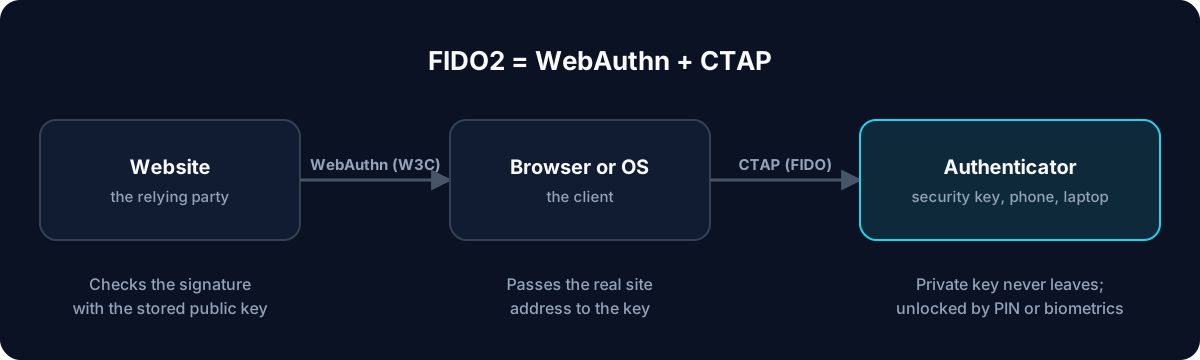
Signing in is a challenge and response. The site sends a random challenge. Your browser passes it to the authenticator together with the address of the site that is asking. You unlock the authenticator with a fingerprint, your face or a PIN, which is checked on the device and never sent. The authenticator signs the challenge with that site’s private key, and the site checks the signature with the public key it stored.
- One key pair per website, made on your device at registration.
- The private key never leaves the authenticator; the site stores only the public key.
- Your fingerprint, face or PIN unlocks the key locally and is never sent to the site.
- Each sign-in signs a fresh random challenge, so a recorded answer cannot be replayed.
- The browser includes the real website address, and the key answers only the site it was made for.
FIDO2 vs WebAuthn vs CTAP: the two halves
People use FIDO2 and WebAuthn almost interchangeably, but they are not quite the same thing. FIDO2 is the name for the pair of specifications; WebAuthn is one of the two.
WebAuthn (Web Authentication) is the part websites use. It is a browser API, a W3C standard since March 2019, that lets a site ask the browser to create a credential or sign a challenge. If you build a website, WebAuthn is the only half you write code against.
CTAP (Client to Authenticator Protocol) is the part the browser and the authenticator use to talk to each other: over USB, NFC or Bluetooth to a security key, or to a phone. Websites never deal with CTAP directly; the FIDO Alliance’s own description is that it is implemented by authenticators and client platforms, not by the sites relying on them.
So, FIDO2 vs WebAuthn: if someone says a site “supports WebAuthn”, it supports FIDO2 sign-in; if a security key is “FIDO2”, it speaks CTAP2 and will work with any WebAuthn site.
FIDO2 vs U2F: from second factor to passwordless
U2F, Universal 2nd Factor, was the first FIDO standard most people met: the small USB key you touched after typing your password. It was a second factor only: it made a stolen password useless on its own, but you still needed the password.
FIDO2 is its successor. With the release of FIDO2, the FIDO Alliance relabelled U2F as CTAP1, so older U2F keys still work as a second factor with WebAuthn sites. What U2F was not designed for is the newer part: credentials stored on the key that let you sign in with no username or password at all, protected by a PIN or a fingerprint on the key.
In short: every U2F job can be done by FIDO2, and FIDO2 adds passwordless sign-in, phones as authenticators, and support in every major browser.
FIDO vs passkey: what is the difference?
There is less difference than the names suggest. A passkey is a FIDO credential: the FIDO Alliance defines a passkey as “an authentication credential based on FIDO standards”. Passkey is the friendly name the industry settled on for FIDO2 credentials that replace a password.
The practical difference is where the credential lives. Early FIDO meant a physical security key. A passkey is usually stored by your phone, your computer, a password manager or an authenticator app, which means you already carry it and nothing extra has to be bought.
So, fido vs passkey: FIDO is the standard and the organisation; a passkey is the thing you create with it. A FIDO2 security key can hold passkeys too.
Synced vs device-bound passkeys
The FIDO Alliance describes two kinds. Synced passkeys are copied securely between your devices by the service that stores them, so a new phone already has them. Device-bound passkeys never leave the one device that made them, as on a hardware security key.
Synced passkeys are far easier to live with: losing a phone does not lose the passkey. Device-bound ones give a stronger guarantee that the key exists in exactly one place, which is why NIST does not allow syncable authenticators at its highest assurance level, AAL3. For personal accounts, synced passkeys are a large step up from passwords and codes. For admin and high-risk accounts, a hardware security key is worth the cost.
Either way, keep a way back in: a second passkey on another device, or the site’s backup codes.
Why FIDO2 is phishing-resistant
Phishing works because a person cannot reliably tell a real site from a perfect copy. FIDO2 takes that judgement away from the person. The browser tells the authenticator the real address of the page, and a FIDO2 credential made for one site cannot be used by another, so a lookalike domain receives nothing it can replay.
Codes and push approvals do not have this property: a fake page can ask you for a code and pass it to the real site within seconds, and US government guidance (CISA) calls FIDO/WebAuthn the only widely available phishing-resistant authentication for exactly this reason.
There is also nothing worth stealing on the server side. A site breach exposes public keys, which cannot sign anyone in, and there is no shared secret to leak, unlike passwords and authenticator app secrets.
FIDO2 security keys, phones and U2 Secured Authenticator
You can carry FIDO2 credentials in two ways. A FIDO2 security key is a small USB or NFC device that holds keys and needs a touch or a PIN; it is the strongest option for accounts that matter most. A phone or computer can act as an authenticator too, using the operating system’s passkey support and whichever app you choose to store passkeys.
U2 Secured Authenticator is one of those apps. It is a passkey provider on iPhone (iOS 17 and later) and Android (Android 14 and later): turn it on in your phone’s passkey settings, and sites that support passkeys can save them in the app, next to your 2FA codes.
Passkeys are free on every plan. Premium, at $14.99 a year, includes them in an end-to-end-encrypted backup, so a new phone restores them. The app is not a hardware security key; for a device-bound key, buy one from a FIDO2 key maker.