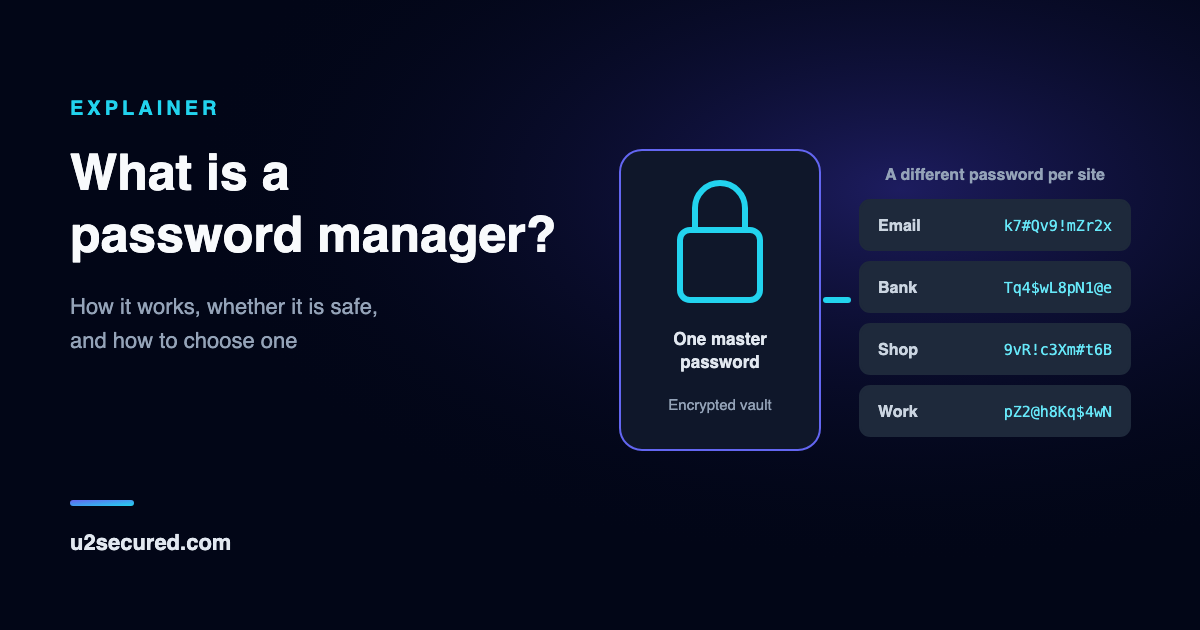
What is a password manager used for?
The everyday job is signing in. You visit a site, the password manager recognises it and offers the saved username and password, and you are in without typing either. When you create an account, it offers a new random password and saves it as you submit the form.
Behind that sits a short list of jobs a human memory does badly. Government guidance says the same thing in plain terms: the US cybersecurity agency CISA describes a password manager as a program that “generates, stores and even fills in all your passwords”, and the UK’s NCSC recommends one because it lets you have a unique password for each service.
- Generate: a long random password for each account, far longer than anything you would choose. CISA asks for at least 16 characters; a generator makes that free.
- Store: every password, plus the usernames, notes and other secrets that go with them, encrypted in one vault.
- Fill: the right password into the right site, on your computer and phone.
- Warn: many managers flag passwords that are weak, reused, or known to have leaked in a breach, so you know which to change first.
- Share: some let you pass a password to someone else without pasting it into a chat or email.
How does a password manager work?
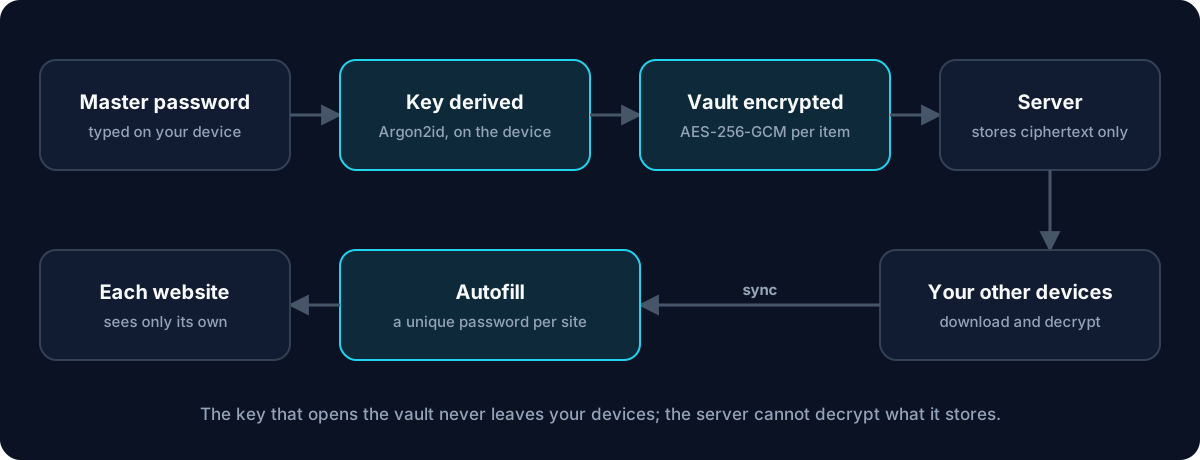
A well-built password manager is designed so that the company running it cannot read your passwords. The trick is where the encryption happens: on your device, before anything is uploaded.
When you create the vault, your master password goes through a deliberately slow function that turns it into an encryption key. The vault is encrypted with that key on your phone or computer, and only the encrypted result is sent to the company’s servers for safekeeping and sync. The server holds data it has no key to open. This design is usually called zero-knowledge.
Signing in to the service is kept separate from unlocking the vault. Your device derives two different values from your master password: one proves who you are to the server, the other decrypts the vault and stays on the device. A breach of the server would expose encrypted vaults and login data, not the key.
How do password managers work across devices? The same way: each of your devices downloads the encrypted vault and decrypts it locally once you unlock it with your master password, your fingerprint or your face. A change on your phone is encrypted there, uploaded, and appears on your laptop a moment later.
Not every password manager works like this. Some browser and operating-system password managers protect your passwords with the account you sign in with rather than a separate master password, which is convenient but means they are, in the NCSC’s words, “only as secure as your devices and accounts”.
Are password managers safe?
For almost everyone, using a password manager is much safer than the alternatives people actually use: the same few passwords everywhere, small variations of one password, a notebook, or a note on the phone. The reuse problem is the one that gets accounts taken over in bulk, and a password manager removes it.
Is a password manager safe if the company itself is hacked? That depends on the encryption design above. If the vault is encrypted on your devices with a key the company never receives, attackers who break into the servers get encrypted vaults. What then protects you is the strength of your master password, because a stolen vault can be attacked offline by guessing master passwords, slowly, one at a time. A long master password that you use nowhere else makes that guessing impractical.
Safety also depends on the devices you use it on. A password manager cannot protect a vault that is unlocked on a computer already running malware, and it cannot stop you from typing your master password into a fake page. Turn on two-step verification for the password manager account too, as the NCSC advises.
What a password manager does not stop: a phishing page that tricks you into typing a password by hand, malware on an unlocked device, or someone who knows your master password. Autofill helps with the first, because a good manager will not offer your bank’s password on a lookalike address, so treat “it didn’t autofill” as a warning sign.
Can password managers be hacked? What happens if one is
Yes: password manager companies are targets, and breaches have happened. The useful question is what a breach would give the attacker, and that is something you can check before you choose.
If the vault is encrypted on your device, a server breach exposes the encrypted vaults plus whatever the company stores unencrypted. That usually includes your email address, when you signed in and from where, and how many items you have. Some products have also left parts of each item, such as the website address, unencrypted. Our post on what zero-knowledge actually means lists what a server still sees even when the claim is true, and four checks you can run on any provider.
What should you do if your password manager is breached? Read what the company says was taken. If encrypted vaults were copied, change the master password, and then change the passwords for your most important accounts first, starting with email, because email resets everything else. If your master password was long and unique, the risk is low; if it was short or reused, act quickly.
Password manager pros and cons
Password managers are not magic, and it is worth being clear about the trade-offs before you move every account into one.
- Pro: a different strong password for every account, without remembering any of them.
- Pro: autofill is faster than typing, and it refuses to fill on a site whose address does not match.
- Pro: your passwords follow you to a new phone or computer instead of living in one browser.
- Con: one master password protects everything, so it has to be strong and must not be used anywhere else.
- Con: forget the master password and, with a zero-knowledge design, nobody can recover your vault. That is the price of the company not being able to read it.
- Con: you depend on the provider’s apps and service; check that you can export your data if you ever want to leave.
Do I need a password manager if I use passkeys?
For now, yes. Passkeys replace passwords on the sites that support them, and they are a real improvement: there is nothing to type, reuse or phish. But most of your accounts still have a password, and many will for years. A password manager handles those, and many password managers now store passkeys too.
Passkeys also need somewhere to live: your phone’s built-in password manager, a separate password manager, or an authenticator app that acts as a passkey provider. Our explainers on what FIDO2 is and on passwordless login cover how passkeys work and where they are kept.
How to choose a password manager
Feature lists all look alike. These are the questions that actually separate products, roughly in order of importance.
- Where is the vault encrypted? On your device, with a key derived from your master password that the company never receives, is the answer you want. Look for a published security design, not just the phrase “military-grade”.
- What does the server still see? Ask which fields are left unencrypted (site addresses, item names) and what account metadata is kept.
- Does it run where you do? Check the phone apps and the browsers you use. A manager that does not fill on one of your devices will not get used there.
- Can you get in on a new phone? Find out how you sign in on a new device and what happens if you lose the master password, before you need to.
- Can you leave? An export to a standard file means you are never locked in.
- What does the free plan really include? Item limits, device limits and which features are paid differ more than prices do.
- Then the habits: pick a long master password you have never used, turn on two-step verification, import or re-enter your passwords, and change the reused ones first, starting with email.
U2 Secured Password Vault
U2 Secured Password Vault is our password manager. It is zero-knowledge in the sense above: your master password and email go into Argon2id (64 MiB of memory, 3 passes) on your device, the key that decrypts the vault never leaves the device, and each item is encrypted with AES-256-GCM under a fresh 96-bit nonce. Our security page walks through the design in full.
It runs in the browser, on iPhone and Android, and as a Chrome extension that fills passwords in and offers to save new ones. It generates passwords, and it can share a password through a link that expires or burns after one view, so it never sits in a chat history.
The free plan is for one person and holds up to 500 items, with 60 share links a month. Paid plans add breach checks, which send only the first 5 characters of a password’s hash, never the password. One honest caveat: on phones, the vault key is kept in the phone’s secure keychain behind Face ID, your fingerprint or the device passcode so that biometric unlock works, so on mobile your phone’s passcode matters as much as your master password.
Two-factor codes are deliberately kept out of the vault: they live in the separate U2 Secured Authenticator app, free and unlimited, so one stolen vault cannot hold both of your factors.