MFA software for small business, without paying per person
Put a second step in front of the logins an attacker would want most: your Linux servers, Windows Server, your WordPress site and the software you build. Each person taps a number on their phone, and on Linux and Windows a code from the same app works when there is no connection.
One flat monthly price covers the whole team, with a free plan to start on. U2 Secured adds MFA to those systems. It does not sign people in to Microsoft 365 or Google Workspace, which have two-step settings of their own.
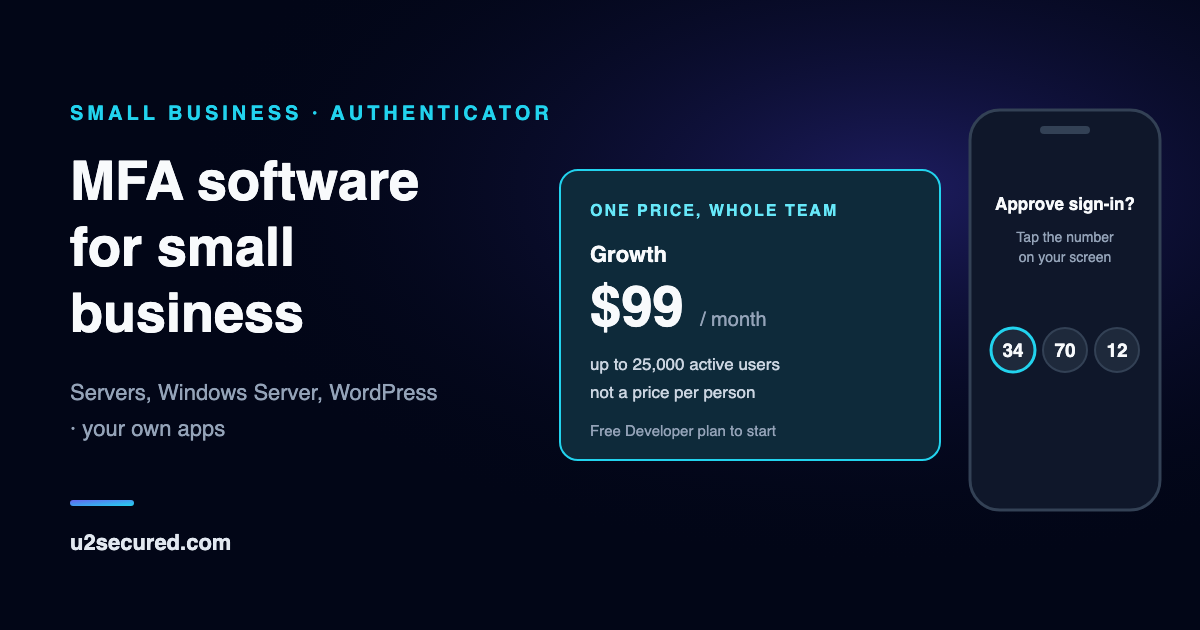
What this MFA solution protects, and how
Linux servers and desktops
SSH, sudo, su, and the Ubuntu login and lock screens, from a signed APT repository for Ubuntu 22.04 or 24.04 or Debian 12.
Windows Server and Remote Desktop
One MSI adds the approval to the sign-in screen, unlock and Remote Desktop, for local Windows accounts, with no gateway to run.
WordPress
A free plugin on wordpress.org holds the login until the phone approves. Require it by role, with a grace period for people to link their phone.
The software you build
Add the same approval to your own product or internal tools, with clients for Node, Python, Go and PHP.
Number matching, not a bare Approve
The login shows a number and the phone shows three. A push nobody asked for cannot be approved by reflex, and a wrong number denies the sign-in.
Location from the phone that approved
Each approval can carry the location of the phone that approved it, with the user’s permission, rather than a guess from an IP address. The portal shows the city, region and country and never the exact point, which stays on our servers. You can require a location before an approval counts.
Codes when the internet is down
On Linux and Windows machines, a code from the app or a one-time backup code is checked on the machine itself, so an outage does not lock your team out.
A log of who signed in where
Every registered machine appears in the portal with its sign-ins, including offline ones, which it reports once it is back online. Each push sign-in is logged with its outcome and the country, and history is kept 7, 30, 90 or 365 days depending on the plan. Download the log as a CSV from the portal, or pull new entries through the server SDKs. Both work on every plan and cover the history your plan keeps.
A rule for a new country
The first sign-in from a country an enrolment has not used before is flagged in the log, and a policy can flag it, deny it or ask for a further check. The same choices apply to a new device.
Roll out one person at a time
On Linux and Windows machines only the group you choose is asked for U2 Secured, and an emergency account stays outside it while you test.
What MFA software costs a small team
Per-person pricing grows with every hire. At list prices, with Duo’s licences sold in tens, the $99 Growth plan costs less than Duo Essentials from 31 people, and less than Advantage or Premier from 11. Every Duo entry is read from Duo’s own site; the link on each row goes to it, dated the day it was read.
Choosing multi-factor authentication software for a small team
Start from the logins an attacker would want most, then check four things before you pay for anything.
- Coverage: does it protect the systems you actually run? U2 Secured covers Linux servers and desktops, Windows Server and Remote Desktop for local accounts, WordPress, and your own software.
- A push that cannot be approved by reflex: number matching makes the user pick the number on screen, on every U2 Secured plan.
- A way in when the internet is down: codes checked on the machine itself, so an outage does not lock the team out.
- A price that does not grow with every hire: per-user pricing does, and a flat monthly plan does not.
Not for Microsoft 365 or Google Workspace sign-in: U2 Secured does not sign people in to those, and it is not a single sign-on provider. Use their own two-step settings for those accounts.
Get started in four steps
Each system has its own guide in the developer docs, with the exact commands and how to test them.
- 1
Create a free account and an app
In the developer portal, create an app named after your company or fleet, because that name is what people see on every approval.
- 2
Start with what would hurt most
Usually an admin login: an SSH server, a Windows server reached over Remote Desktop, or your WordPress administrators. Follow the guide for that system.
- 3
Pair one phone and test it
Install the free U2 Secured Authenticator on one person’s phone and test a real sign-in while an emergency administrator is still signed in.
- 4
Add everyone else
Enrol the rest of the team, then move to the next system. Choose Growth when you want push for everyone every day.
What MFA costs for a small business
Codes are unlimited on the free plan. Its 100 push approvals are for trying push: every login is one push, so 10 people signing in twice each working day use about 420 a month. Growth covers that and more, at $99 a month however many people you have, up to 25,000.
| Plan | Price | Includes |
|---|---|---|
| Developer | Free | 1,000 active users and 100 push approvals a month, 1 app. Codes are unlimited. |
| Growth | $99/month | 25,000 active users and 100,000 push approvals a month, 5 apps. Codes are unlimited. |
| Team | $149/month | 75,000 active users and 300,000 push approvals a month, 20 apps. Codes are unlimited. |
| Scale | $199/month | 250,000 active users and 1,000,000 push approvals a month, unlimited apps. Codes are unlimited. |
One flat monthly price per developer account, not a price per user or per machine. A fleet of servers is one app; each person who signs in counts once a month however many machines they use. Codes from the app (TOTP) and backup codes are never metered on any plan.
Questions small businesses ask
- Does it add MFA to Microsoft 365 or Google Workspace?
- No. U2 Secured does not sign people in to those services, and it is not a single sign-on provider. Both have two-step settings of their own. Microsoft’s security defaults come at no extra cost and accept codes from a non-Microsoft app, so the U2 Secured Authenticator can hold those codes, free.
- Does it work with domain or Entra ID accounts?
- Not today. On Windows it protects local accounts, and domain and Entra ID accounts are not supported. If your people sign in to servers with domain accounts, this is not the right fit yet.
- Will it work on our office PCs?
- On Windows, it has been run end to end on Windows Server 2025 with a real iPhone. Other editions have not been tested yet, so try one machine first and keep an emergency administrator. On Linux, it covers the Ubuntu login and lock screens as well as SSH.
- What is the cheapest way to start?
- The free Developer plan, with one app, 1,000 active users a month and unlimited codes from the app. If a small team is happy typing a six-digit code, it can stay there. Push for everyone, every day, is what Growth is for.
- What happens if we run out of pushes?
- On a Linux or Windows machine, the sign-in says the monthly limit is reached and asks for a code from the app instead. Pushes come back when the month resets or you upgrade.
- Why is it called a developer account?
- That is the name for the account that owns your apps, keys and machines, and pays the plan. You do not need to write code to protect Linux, Windows or WordPress; the people signing in only need the app.
- Do we need an IT person?
- You need someone comfortable with an admin prompt on Linux or Windows; on WordPress, someone who can install a plugin. There is no server of yours to run, because U2 Secured is a hosted service.
- Does everyone need a smartphone?
- Yes, an iPhone or Android phone with the U2 Secured Authenticator, which is free. There are no text-message codes or hardware tokens. Backup codes cover a lost or flat phone on Linux and Windows machines, and recovery codes do on WordPress.
- Will this satisfy our cyber insurer or auditor?
- We cannot answer for them, so check their wording. Push approvals and one-time codes are multi-factor authentication, but they are not phishing-resistant MFA in the FIDO2 sense, which some policies ask for. The sign-in log gives you a record to show for Linux and Windows machines.
- Is the Windows installer code-signed?
- Yes. Version 0.2.1, and the programs it installs, are signed by DOLLAR MATES PROPRIETARY LIMITED, the company behind U2 Secured, so Windows names it as the publisher when the installer runs. You can also check its SHA-256 against the published SHA256SUMS.
Sources for the other vendors
Every Duo and Microsoft statement above was read from their own sites on the date shown. They change their plans and documentation from time to time; their pages are the authority if anything here has changed.
- Duo — Pricing · read 2026-11-05
- Duo — Duo Unix documentation · read 2026-10-24
- Microsoft Learn — Security defaults for Microsoft Entra ID · read 2026-11-05