The difference between 2FA and MFA
Authentication factors come in three kinds: something you know (a password, a PIN), something you have (a phone, a security key) and something you are (a fingerprint, your face). A factor only counts once per kind: two passwords are still one factor.
Multi-factor authentication is any sign-in that needs at least two different kinds. Two-factor authentication is the case with exactly two, usually a password plus a code or approval from your phone. So the relationship is one-way: 2FA is a type of MFA, and MFA includes 2FA plus anything stricter, such as a password, a security key and a fingerprint together.
Is 2FA the same as MFA, then? In everyday use, yes: consumer services almost always ask for two factors, and the words are used interchangeably. In workplace and government settings, “MFA” is the more common word because policies are written to allow two or more, and because some methods combine two factors in a single step. NIST’s digital identity guidelines, for example, describe a multi-factor authenticator as one that requires two factors to complete a single sign-in, such as a security key that also needs your PIN.
MFA vs 2-step verification (2SV)
Two-step verification, often written 2SV or 2-Step Verification, is the name many companies use for their second sign-in step. It describes the process, two steps, rather than the evidence. Strictly, a password followed by a second password would be two steps but one factor, which would not be MFA at all.
In practice, the second step in every mainstream 2SV feature is a code or approval from your phone, or a security key, so 2SV ends up being the same as 2FA. When you see 2FA, 2SV, two-step or two-factor in a settings menu, it is the same feature under a different label.
2FA vs MFA examples
Concrete cases make the line clear. Each one below says which factors it uses and whether it counts.
- Password plus a six-digit code from an authenticator app: something you know plus something you have. 2FA, and therefore MFA.
- Bank card plus PIN at a cash machine: something you have plus something you know. 2FA, and one of the oldest examples.
- Password plus a security question: two things you know. Not 2FA, however many steps it takes.
- A passkey unlocked with your fingerprint: the passkey on your phone is something you have, and the fingerprint unlocks it. Multi-factor in a single step, with no password at all.
- Password, then a security key, then a fingerprint on the key: three checks across three kinds. MFA, more than 2FA.
- An SMS code alone, with no password: one factor, something you have. Not MFA.
Types of 2FA: the methods behind the second step
The first factor is nearly always a password. The second is one of a handful of methods, and these are the types of 2FA you will be offered.
- SMS or voice codes: a one-time code texted or read to your phone number.
- Email codes or links: a code or link sent to your inbox.
- Authenticator app codes (TOTP): a six-digit code made on your phone every 30 seconds from a secret shared at set-up.
- Push approval: a prompt on your phone that you approve, ideally with number matching, where you pick the number shown on the sign-in screen.
- Passkeys and security keys (FIDO2): a key pair on your phone, computer or a USB/NFC key, unlocked with your fingerprint, face or PIN.
- Backup codes: one-time codes for when your usual method is unavailable. They are a recovery tool, not a daily method.
2FA methods ranked, from weakest to strongest
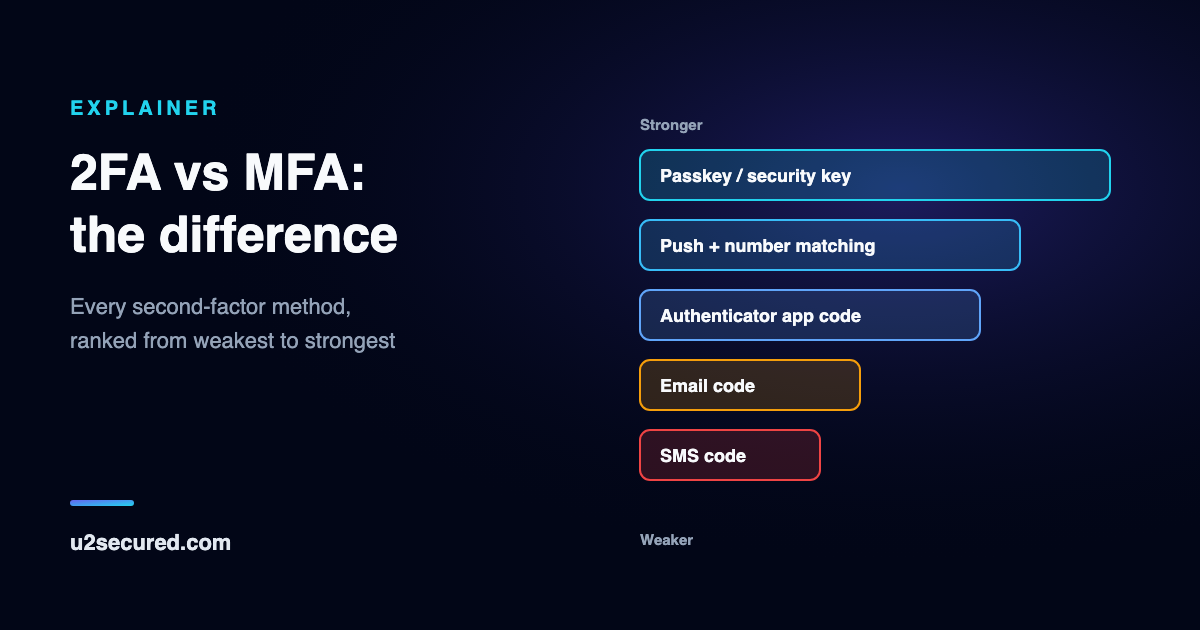
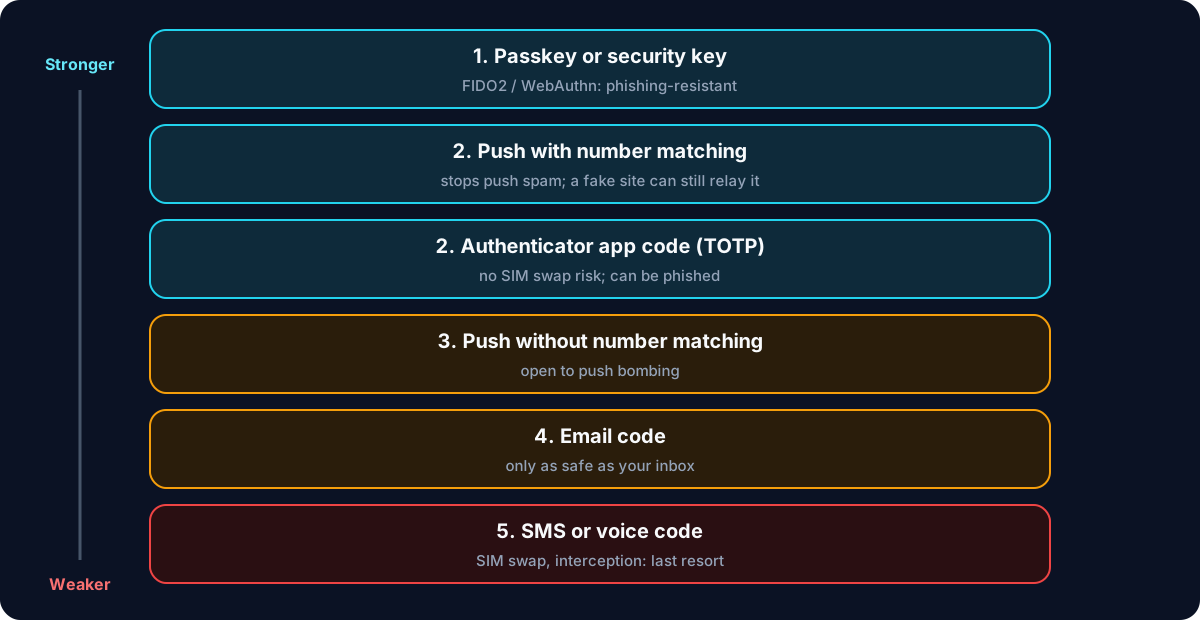
Any second factor is a large step up from a password alone: it stops the most common attack, a password stolen in one breach and tried everywhere. But the methods are not equal, and both US government guidance and NIST say so. This ranking follows CISA’s published order, from the top down.
- 1. Passkeys and security keys (FIDO2 / WebAuthn). The browser tells the key which website is asking, and the key will not answer a lookalike, so a fake site gets nothing to replay. CISA calls FIDO/WebAuthn the only widely available phishing-resistant authentication.
- 2. Push with number matching, and authenticator app codes (TOTP). CISA puts these in the same tier. Neither is tied to your phone number, so SIM swaps cannot reach them, and number matching reduces push fatigue approvals. Both can still be relayed by a real-time phishing page.
- 3. Push without number matching. Everything in tier 2 applies, plus push bombing: an attacker with your password sends prompts until someone taps Approve.
- 4. Email codes and links. As safe as your inbox, which is often protected by nothing more than a password. NIST’s guidelines do not allow email as an out-of-band authenticator.
- 5. SMS and voice codes. Your codes go wherever your number goes, so a SIM swap or interception in the phone network hands them over. NIST classes them as restricted, and CISA calls them a last resort.
Turning on a stronger method does not switch off the weaker one. If SMS stays enabled as a fallback, an attacker can choose it. When you add a passkey or an authenticator app, remove SMS wherever the site lets you.
What is the most secure 2FA method?
A passkey or a hardware security key. They are the only common methods that resist phishing, because the check of which website is asking happens in your browser and on the key, not in your head. A passkey also replaces the password on sites that allow it, so there is no password left to steal.
Between the two: a hardware security key keeps its private key on one physical device that cannot be copied, which is why high-risk accounts and some workplaces require them. A passkey saved in your phone or a password manager can usually be backed up or synced, which is far easier to live with. NIST does not allow syncable authenticators at its highest assurance level, AAL3, for that reason; for personal accounts, either is a big step up from codes.
When a site offers no passkey, the strongest method left is an authenticator app, codes or push with number matching, and the weakest you should accept is SMS.
Which MFA should you use? A rule of thumb
Use the strongest method each site offers, and protect your email account first, because email can reset almost everything else.
- Passkey offered? Use it, and keep a second passkey or the site’s backup codes in case you lose the device.
- No passkey, but an authenticator app? Use the app, and save the backup codes somewhere other than your phone.
- SMS only? Use it rather than nothing, add a PIN to your mobile account to make a SIM swap harder, and switch when the site adds a better option.
- Running a business? Require MFA for every account that can reach company data, and prefer methods with number matching or passkeys. Our page on MFA for small businesses covers SSH, Windows and WordPress sign-ins.
Where U2 Secured fits
U2 Secured Authenticator covers tiers 1 and 2 on one phone. It makes unlimited TOTP codes for free, works with no signal, and locks with Face ID or your fingerprint. It is also a passkey provider on iPhone and Android, so sites can save passkeys in it, free on every plan. On services built on U2 Secured, sign-ins can arrive as a push with number matching instead of a code.
For developers and IT teams, the U2 Secured SDK and integrations add TOTP and push with number matching to your own sign-ins, SSH, Windows and WordPress, with a free Developer tier of 100 push approvals a month and unmetered code checks. It does not provide passkey sign-in for your own site; for that, use a WebAuthn library alongside it.