How does passwordless login work?
Every sign-in answers one question: can you prove you are the person who owns this account? A password answers it with a secret you remember and type. Passwordless authentication answers it with proof that you control something: a device, a key on that device, or an inbox.
The usual flow is two steps. You type your email or username so the site knows which account you mean, or your device offers the right account automatically. Then the site asks for proof: your phone shows a passkey prompt, a sign-in link arrives in your email, or an approval appears on a paired app. You unlock or confirm, and you are in.
Where the proof comes from decides how safe the method is. A passkey proves it with cryptography tied to the real website. An emailed link proves only that you can read that inbox. A code or a push approval proves you have the phone, but a convincing fake site can still ask for it.
Passwordless authentication methods compared
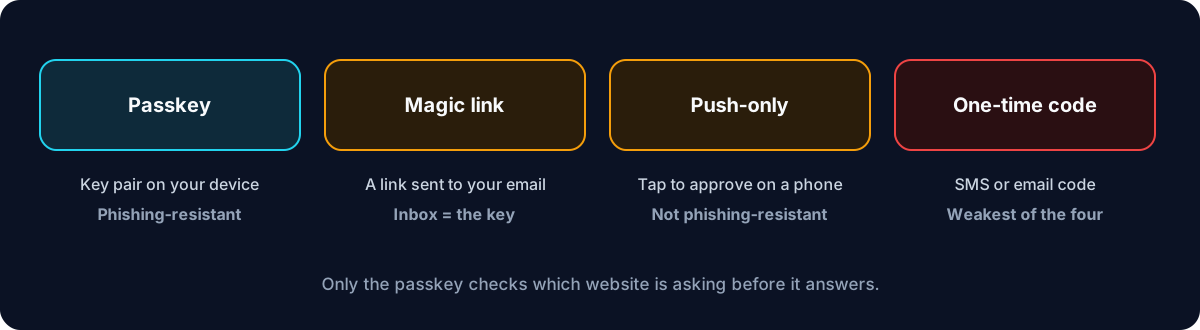
These are the passwordless login methods you will meet, from strongest to weakest.
- Passkeys (FIDO2 / WebAuthn): a key pair made for one site and stored on your phone, computer, password manager or a security key, unlocked with your fingerprint, face or PIN. Passkeys are phishing-resistant, leave nothing secret on the server, and are usually the quickest to use.
- Push-only approval: you enter your username and approve a prompt on a paired phone app, ideally with number matching. Convenient and free of SMS risks, but a fake site can relay the request, and it only works with services that integrate with that app.
- Magic links: the site emails you a one-time link that signs you in when opened. Easy for users, but your email account becomes the key to every account that uses it.
- One-time codes by email or SMS: the same idea with a short code to type. The weakest option: codes can be phished, SMS codes follow your phone number through a SIM swap, and email codes are only as safe as the inbox.
Passwordless vs passkey: are they the same?
Not quite. Passwordless is the goal: any sign-in without a password. A passkey is one way to get there, and the strongest one. Every passkey sign-in is passwordless; not every passwordless sign-in uses a passkey.
The distinction matters because the other methods keep a weak spot that passkeys remove. A magic link or a code is still a secret that travels to you and can be intercepted or phished. A passkey never travels: the private key stays on your device and only answers the real website, because the browser tells it which site is asking. The FIDO Alliance describes passkeys as a password replacement that is phishing-resistant by design.
If a site gives you a choice of passwordless methods, pick the passkey.
Magic link login: how it works, and are magic links secure?
With magic link login, you type your email address and the site sends you a message with a sign-in link. The link carries a long random token that works once and expires after a few minutes. Opening it proves you can read that inbox, and the site signs you in.
Are magic links secure? They are better than a weak or reused password, and they stop password stuffing completely. But they inherit every weakness of your email account. Anyone who can read your inbox, through a stolen email password, a shared computer or a forwarded message, can sign in as you. That is why NIST’s digital identity guidelines do not allow email to be used as an out-of-band authenticator.
Magic links also add friction: switching to the mail app, waiting for the message, and opening the link on the same device. For a low-risk account, such as a newsletter or a forum, they are a reasonable choice. For anything holding money or personal data, a passkey is the better passwordless option, with email kept for account recovery.
If you use magic links, protect the email account that receives them with a strong password and two-factor authentication, ideally a passkey. It is now the key to every account that signs in through it.
Passwordless vs MFA: is passwordless authentication secure?
Passwordless and multi-factor are separate questions. MFA asks how many kinds of evidence a sign-in uses; passwordless asks whether one of them is a password. A sign-in can be both, either, or neither.
A passkey is both at once: the key on your phone is something you have, and the fingerprint, face or PIN that unlocks it is something you are or know. That is why sites that accept passkeys often skip the second step altogether. A magic link, by contrast, is passwordless but single-factor: it proves only that you hold the inbox.
So is passwordless authentication secure? With passkeys, yes: it is more secure than a password plus a code, because it resists phishing and leaves nothing on the server worth stealing. With magic links or codes alone, it is about as secure as the inbox or phone number behind it, which may be less secure than a strong password plus an authenticator app.
How to implement passwordless authentication on your site
For a website or app, these are the decisions that matter, in order.
- Start with passkeys. Use the WebAuthn browser API through a maintained library for your server language rather than writing the cryptography yourself. Offer “Create a passkey” after sign-in, then let returning users sign in with it.
- Keep a fallback during the transition. Most users will not have a passkey on day one. Keep the existing sign-in, and add the passkey as the faster route.
- Treat account recovery as part of the design. A passwordless login is only as strong as the way back in when a device is lost. If recovery is an emailed link, your sign-in is effectively as strong as that email.
- Use magic links for low-risk accounts only, single-use and short-lived, and never as the only protection for payments or admin access.
- If you add push approval, require number matching and show the number on your sign-in page; it is what stops a tired user approving a request they did not start.
- Log every sign-in method used, so you can see adoption and spot attacks on the fallback.
Passwordless sign-in with U2 Secured
For people signing in: U2 Secured Authenticator is a passkey provider on iPhone (iOS 17 and later) and Android (Android 14 and later), free on every plan. Switch it on in your phone’s passkey settings, and sites that support passkeys can save them in the app beside your 2FA codes.
For developers: the U2 Secured SDK sends push approvals with number matching to users who have paired the U2 Secured Authenticator with your app. Your backend can use it as the second step after a password, or as a push-only sign-in in which the user enters their email or username and approves on the phone. The free Developer tier includes 100 push approvals a month. Push-only sign-in is convenient but, unlike a passkey, not phishing-resistant, so keep it for accounts where that trade-off is acceptable.
What U2 Secured does not offer developers: passkey (WebAuthn) or magic-link sign-in for your own site. For passkeys, use a WebAuthn library; the U2 Secured push and codes can sit alongside it as the second factor or the fallback.