Microsoft Entra ID MFA with number-matching push, for Microsoft 365
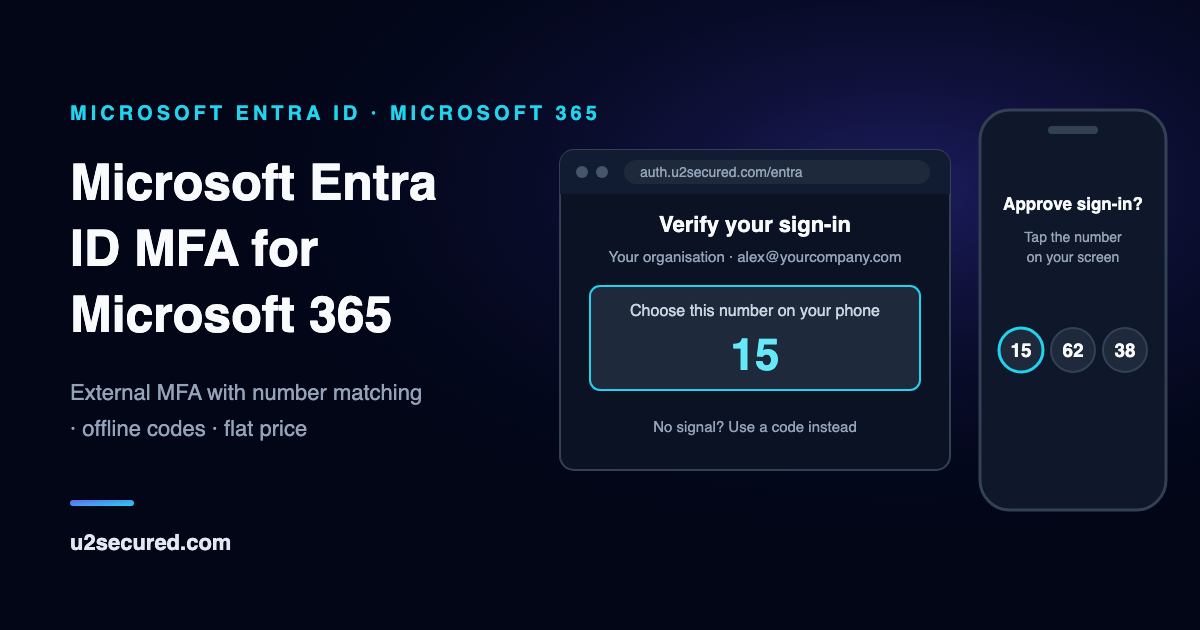
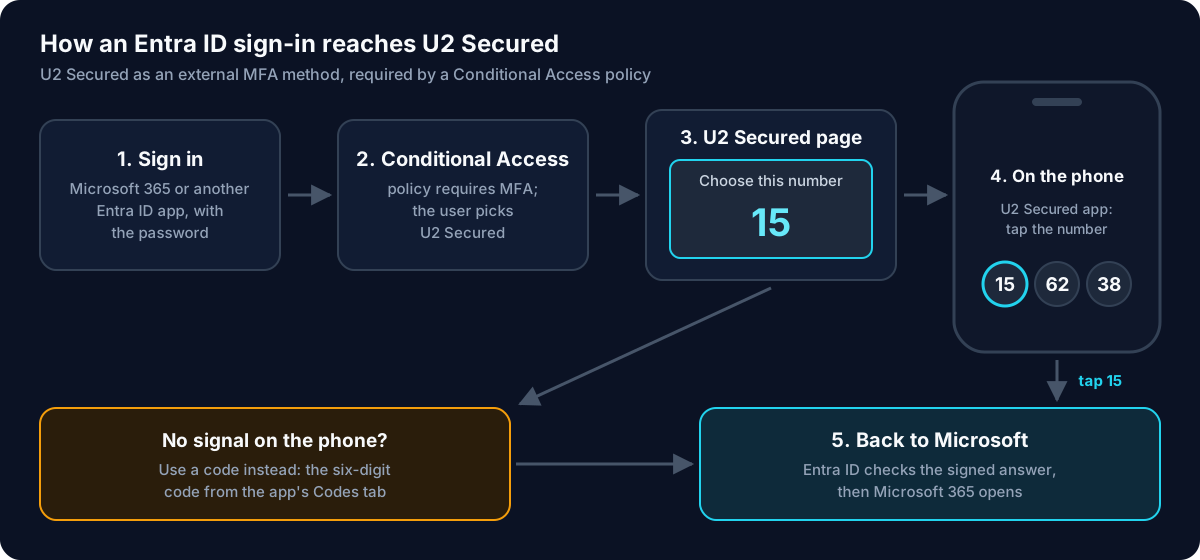
U2 Secured works as an Entra ID external authentication method, which Microsoft now calls external MFA. When a Conditional Access policy asks for multifactor authentication, your people choose U2 Secured, match a number on their phone, and go straight back to Microsoft 365 or whichever app they were opening. When the phone has no signal, a six-digit code from the same app works instead.
Conditional Access needs Microsoft Entra ID P1, which Microsoft 365 Business Premium includes. On the U2 Secured side there is a free plan, and the paid plans are one flat monthly price, not a price per user.
What the Entra ID external authentication method does
Microsoft Entra ID keeps the decision. It evaluates your Conditional Access policies and hands only the second-factor step to U2 Secured, then checks U2 Secured’s signed answer before it lets the sign-in through.
Number matching on every sign-in
The U2 Secured page shows a number and the phone offers three. A wrong pick, or Deny, refuses the sign-in, so a push nobody asked for cannot be approved by reflex. It works the same on the free plan.
A code when the phone is offline
During setup each person scans a key into the Codes tab of the U2 Secured app. When the phone has no signal, they choose “Use a code instead” and type the current six-digit code.
Your name on the prompt
Show your organisation’s name and logo on the page people see when Microsoft asks them to verify a sign-in, and on the setup page, so the prompt is recognisably yours.
Every approval on record
Push and code sign-ins appear in the app’s Activity in the developer portal, and the Users tab lists everyone who has linked a phone, with each person’s authentication history.
A lost phone goes through IT
A linked phone cannot be swapped by opening the setup page again. An admin resets the person’s phone link in the Users tab, then they link the new phone, so a stranger with a password cannot quietly move someone’s approvals to their own phone.
Roll out to a pilot group first
Target the method and the Conditional Access policy at one group, keep your emergency accounts excluded, and widen both once the pilot signs in without trouble.
A Duo alternative for Microsoft 365, on price
Duo also plugs into Entra ID as an external MFA provider, so for Microsoft 365 the choice comes down to fit and price. Duo prices per user; U2 Secured prices per account. At list prices, with Duo’s licences sold in tens, the $99 Growth plan costs less than Duo Essentials from 31 people, and less than Advantage or Premier from 11. Every Duo entry is read from Duo’s own site, dated the day it was read.
MFA for Microsoft 365 without paying per user
U2 Secured is asked whenever people open Microsoft 365, or any other app a Conditional Access policy covers, and the policy requires multifactor authentication. Each approval counts toward your plan’s monthly push approvals and each person toward its monthly active users, and codes are never metered.
The free Developer plan connects one Entra tenant, with 1,000 active users and 100 push approvals a month: enough to run a pilot group. Growth, at $99 a month, covers 25,000 active users and 100,000 approvals, so the 200th person costs the same as the first.
For MSPs looking after several Microsoft 365 tenants
Each Entra tenant connects to its own U2 Secured app, and one U2 Secured account holds many apps: 5 on Growth, 20 on Team and unlimited on Scale. Each client keeps its own app, setup link, branding and user list, and the whole book of tenants sits under one flat plan instead of a licence count per client.
A Microsoft Authenticator alternative for Entra ID
Adding U2 Secured does not take Microsoft Authenticator away. Microsoft says that a user who has other methods, with system-preferred authentication on, is offered those first and can choose the external method instead, so you can pilot U2 Secured with one group while everyone else carries on as before.
The reason to choose U2 Secured is one approval app across more of what you run: Microsoft 365 through Entra ID, plus SSH and sudo on Linux, Windows Server local accounts with Remote Desktop, WordPress and your own software, under the same flat plan.
What you need before you start
Microsoft’s requirements first, then U2 Secured’s.
- Microsoft Entra ID P1 or P2. Conditional Access requires P1, and Microsoft 365 Business Premium includes Conditional Access.
- In Entra: an Authentication Policy Administrator adds the method, a Privileged Role Administrator grants consent to the U2 Secured application, and a Conditional Access Administrator creates the policy.
- In U2 Secured: a free account, and an admin who connects the tenant while signed in as a Global Administrator or Privileged Role Administrator. U2 Secured checks that role and never sees the password.
- For each person: an iPhone or Android phone with the free U2 Secured Authenticator.
What it does not cover
Know these before you plan a rollout.
- Conditional Access authentication strengths: Microsoft does not let an external method satisfy one, so use the “Require multifactor authentication” grant.
- Windows sign-in on Entra-joined PCs: that does not go through Conditional Access, so U2 Secured is not asked there. U2 Secured’s own Windows add-on protects local accounts only.
- On-premises Active Directory: not supported. U2 Secured works with Microsoft Entra ID, not with an on-premises domain.
- US Government and 21Vianet clouds: only the global Microsoft cloud is supported.
- Directory sync: people appear in the Users tab once they link a phone.
Set up U2 Secured in Entra ID, step by step
The IT-admin guide in the developer docs walks through each step with screenshots, and there is a separate, non-technical guide to forward to your users.
- 1
Connect your Entra tenant
In the developer portal, create an app of the type “Microsoft Entra ID”, choose Connect Microsoft Entra, and approve the U2 Secured application for your tenant. The portal then shows a Client ID, a Discovery Endpoint and an App ID.
- 2
Add U2 Secured as an external method
In the Microsoft Entra admin center, open Entra ID, then Authentication methods, and add external MFA. Name it “U2 Secured”, paste the three values, switch Enable on and target your pilot group.
- 3
Require MFA with Conditional Access
Create a policy for the pilot group that grants access with “Require multifactor authentication”, exclude your emergency accounts, and turn it on.
- 4
Protect the setup page
Add a second policy for the “U2 Secured” application, so linking a phone needs more than a password. For new staff with no method yet, a one-time Temporary Access Pass gets them through; delete it once their phone is linked.
- 5
Send people the setup link
Each person opens it once, signs in with Microsoft, links the U2 Secured app with a pairing code and scans the offline code. About five minutes each.
What Entra ID MFA costs with U2 Secured
Every approval counts toward the plan’s monthly push approvals and every person toward its monthly active users; codes are never metered. When a cap is reached no push is sent, and people who set up the code can still sign in with it until the month resets or you upgrade, unless your risk settings require approval on the phone. Usage emails go out at 80%, 90% and 95%.
| Plan | Price | Includes |
|---|---|---|
| Developer | Free | 1,000 active users and 100 push approvals a month, 1 app. Codes are unlimited. |
| Growth | $99/month | 25,000 active users and 100,000 push approvals a month, 5 apps. Codes are unlimited. |
| Team | $149/month | 75,000 active users and 300,000 push approvals a month, 20 apps. Codes are unlimited. |
| Scale | $199/month | 250,000 active users and 1,000,000 push approvals a month, unlimited apps. Codes are unlimited. |
One flat monthly price per account, not a price per user or per machine. A fleet of servers is one app; each person who signs in counts once a month however many machines they use. Codes from the app (TOTP) and backup codes are never metered on any plan.
Compare all plansQuestions IT admins ask about Entra ID MFA
- Do I need Entra ID P1?
- Yes. U2 Secured is asked through Conditional Access, and Microsoft says Conditional Access requires Microsoft Entra ID P1 licences. Microsoft 365 Business Premium customers can also use Conditional Access. On the U2 Secured side, the free plan works.
- Can users still use Microsoft Authenticator?
- Yes. Microsoft offers a user their other enabled methods, and they can choose U2 Secured instead. On the first sign-in after setup, Microsoft may suggest installing Microsoft Authenticator; people choose “Other options”, then “External MFA”, and that happens once.
- What if the phone is offline?
- On the U2 Secured page, choose “Use a code instead” and type the six-digit code from the Codes tab of the app, added once during setup. The computer still needs to be online, because the sign-in is to Microsoft.
- Does it protect Windows sign-in on Entra-joined or domain-joined PCs?
- No. Windows sign-in does not go through Conditional Access, so U2 Secured is not asked there. U2 Secured’s Windows add-on, for Windows sign-in and Remote Desktop, protects local accounts only.
- Does it work with on-premises Active Directory?
- No. It works with Microsoft Entra ID in the global Microsoft cloud, through external MFA and Conditional Access. On-premises Active Directory is not supported.
- Can it satisfy an authentication strength, or phishing-resistant MFA?
- No. Microsoft does not let an external method satisfy an authentication strength, and a push approval or a one-time code is not phishing-resistant in the FIDO2 sense. Use the “Require multifactor authentication” grant.
- Is external MFA still in preview?
- No. Microsoft Learn describes external MFA, previously called external authentication methods, as generally available.
- Users see “Verification failed” right after we added the method
- For a while after an admin adds or changes the method, Microsoft can answer with “Verification failed. Try again in a few minutes” before it sends anyone to U2 Secured. Wait and try again: in our own testing it cleared within a few hours. Avoid deleting and re-creating the method meanwhile.
- Is the U2 Secured application publisher-verified?
- Yes. Microsoft has verified DOLLAR MATES PROPRIETARY LIMITED, the company behind U2 Secured, as the publisher of the U2 Secured application. Microsoft says a verified publisher is not a certification of the app.
Sources for Microsoft and Duo
Every Microsoft statement above was read on Microsoft Learn, and every Duo statement on duo.com, on the date shown. U2 Secured is not affiliated with or endorsed by Microsoft or Cisco. Their pages are the authority if anything here has changed.
- Microsoft Learn — How to manage external MFA in Microsoft Entra ID · read 2026-11-17
- Microsoft Learn — Microsoft Entra external MFA method provider reference · read 2026-11-17
- Microsoft Learn — Migrate from custom controls to external MFA in Conditional Access · read 2026-11-17
- Microsoft Learn — Microsoft Entra Conditional Access (licence requirements) · read 2026-11-17
- Microsoft Learn — Publisher verification overview · read 2026-11-17
- Duo — Microsoft Entra ID External MFA · read 2026-11-17
- Duo — Editions and Pricing · read 2026-11-13